How to refresh a page for various browsers?
(Academy)
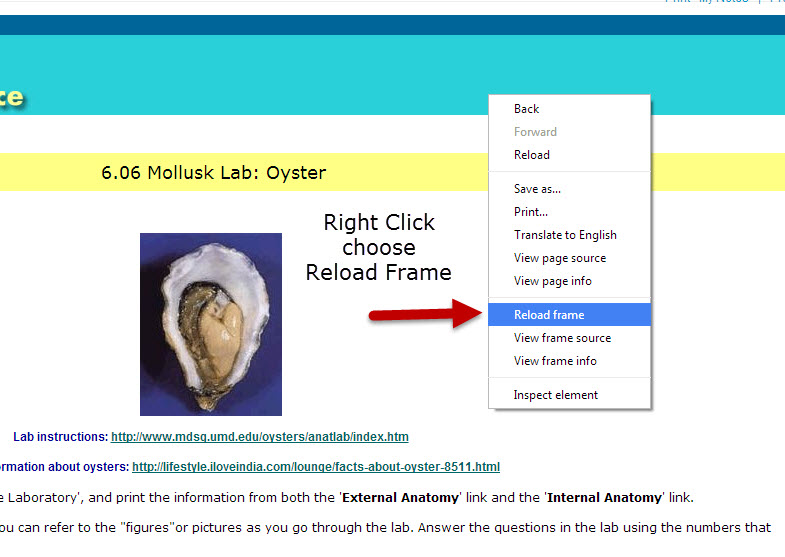
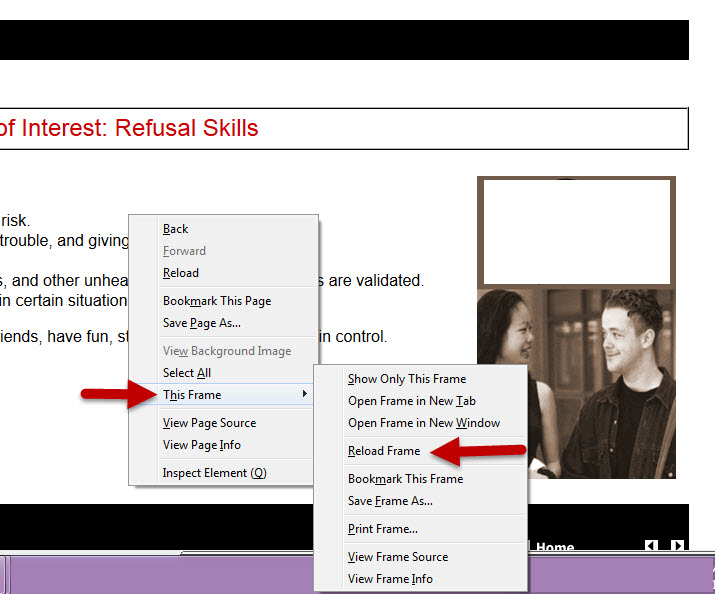
If this does not show the changes you expected, RIGHT CLICK and choose Reload Frame.
This will ensure the fresh page loads with the expected changes.
Mac Users: Hold down the Apple Command key and push the F5 key
Google Chrome Refresh/Reload Frame:
Firefox Refresh/Reload Frame:
Related Articles
How to fix a 419 Page Expired error ?
(Academy) You might have received a 419 Page Expired error code for a couple of reasons: either a user has been inactive for too long, and their session is expiring, or the server terminates the session for security or maintenance reasons. The ...How to clear your temporary internet files?
(Academy) Try using a different browser. If you’re already using a supported browser, you can refresh the page and try signing in again. Make sure there isn't a network issue preventing things from loading (firewall or security at your location), and ...Browsers/Programs/Plugins you may need
(Academy) What Browser and Operating System are you using? Click here to find out http://www.whatsmybrowser.org/ Copy paste the link generate on that page to send to support if needed Download Browsers Firefox ...What do you do if the course lesson pages are blank?
(Academy) Mixed content occurs when the initial request is HTTPS, but HTTPS and HTTP content are loaded to display the web page. HTTPS content is secure. HTTP content is insecure. Modern browsers might block a page or display warning messages if ...Browser settings for Safari on iPad
Safari is the default browser on an iPad, and it is essential to ensure that the browser settings are correctly configured for optimal performance. Here are some tips on adjusting the settings on Safari: Select 'Settings' on your iPad, and scroll ...